MapleStory M Clock Bot
Every MapleStory M timer your guild cares about, in one live message: resets, Guild Scramble, Culvert, Path of Proof and your weekly boss run, with role pings before each one.
Free on every server. Every feature and command, no premium.
What it does
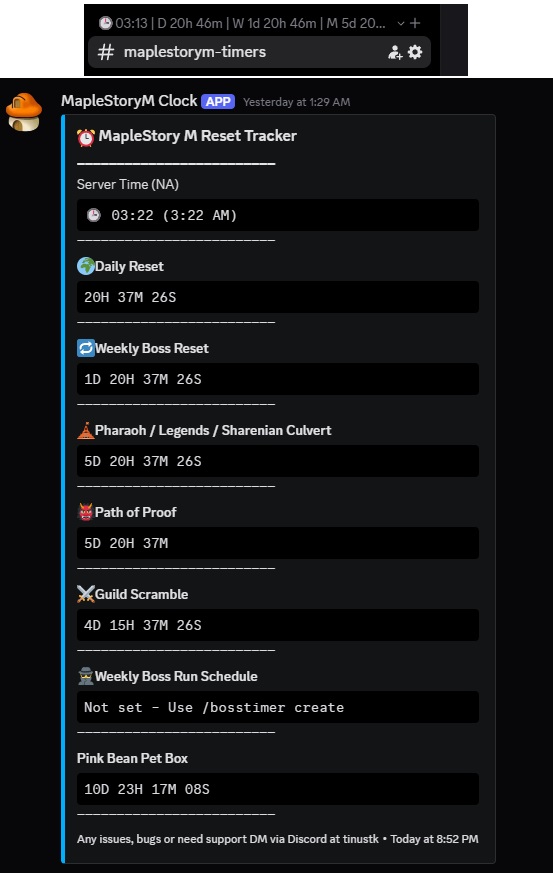
Everything updates live every 5 seconds, so the countdowns are always right.
- Live embedServer time (24-hour and 12-hour), Daily Reset and Weekly Boss Reset.
- Channel name timersThe category name updates every 10 minutes with compact reset times.
- Guild ScrambleA countdown, and role pings when it's starting soon, 5 minutes out and starting now.
- CulvertPharaoh / Legends / Sharenian Culvert countdown with a ping 1 hour before.
- Path of ProofA 28-day timer that resets itself, with a ping 1 hour before it ends.
- Weekly boss runYour guild's boss run on your own day and time, with your own message.
- Countdown timersAs many named timers as you like, each with its own ping when it runs out.
- Custom pingsDaily or weekly scheduled role pings with your own message.
- Auto-repostIf the embed gets deleted, the bot posts it again.
Set up in four steps
Add the bot, then run /setup. You need the Manage Server permission.
- RegionPick your server region: NA or ASIA. For Europe you'll also give a UTC offset.
- CategoryPick the category the bot will rename with live timers.
- Embed channelPick the text channel where the live reset embed is posted.
- RolePick the role the bot pings for all notifications.
After you confirm, the bot posts the live embed and starts tracking straight away.
Running /setup again on a server that's already set up shows a warning first, because it resets all data.
Commands
All commands are free.
General
| Command | What it does |
|---|---|
/setup | Run the 4-step setup (needs Manage Server) |
/help | Show all commands |
Settings
| Command | What it does |
|---|---|
/settings look_new | New-style embed (separator lines, lowercase units) |
/settings look_old | Classic embed layout (default) |
/settings dash_on | Dashes in countdown strings |
/settings dash_off | No dashes in countdown strings (default) |
Boss run and Path of Proof
| Command | What it does |
|---|---|
/bosstimer create | Set up your weekly boss run |
/bosstimer clear | Remove the boss timer |
/poptimer set | Set the Path of Proof 28-day countdown |
/poptimer clear | Clear the Path of Proof timer |
For the boss run, pick the day of the week, a time (HH:MM in your server's timezone), the ping message (e.g. Boss run starts now! Log in!) and who to ping.
Countdown timers
| Command | What it does |
|---|---|
/countdowntimer create | Make a named timer with a ping when it ends |
/countdowntimer check | List all active timers |
/countdowntimer clear <number> | Remove a timer by number |
/countdowntimer hide | Hide timers from the embed |
/countdowntimer show | Show timers in the embed |
Give it a title (e.g. Moonlight Event), a duration in days, hours and minutes, and the message to send when it runs out.
Custom pings
| Command | What it does |
|---|---|
/customping create | Make a daily or weekly ping |
/customping list | See all pings and their numbers |
/customping delete <number> | Delete a ping by number |
Choose daily or weekly (and the day), a time (HH:MM), your message, and who to ping: the default role, another role, or one person.
Automatic pings
Pings tag the role you chose in /setup, or another role or person if you set one.
Ping messages delete themselves 2 minutes after they're sent.
| Event | When it pings |
|---|---|
| 🛕 Pharaoh / Legends / Sharenian Culvert | 1 hour before the weekly reset |
| ⚔️ Guild Scramble | Saturday and Sunday at 7:00 PM (starting soon), 7:05 PM (5 minutes left) and 7:10 PM (starting now) |
| 👹 Path of Proof | 1 hour before the timer ends |
| 🕵️ Boss run | At the day and time you set |
| 🗓️ Custom pings | At the daily or weekly time you set |
| ⏳ Countdown timers | When a timer reaches zero |
The channel name updates every 10 minutes and looks like this:
Questions or bugs?
Message tinustk on Discord for help, bug reports or ideas.